

Configure Laravel for Upsun
Back to home
On this page
You now have a project created on Upsun.
In many ways, a project is just a collection of tools around a Git repository. Just like a Git repository, a project has branches, called environments. Each environment can then be activated.
Active environments are built and deployed, giving you a fully isolated running site for each active environment.
Once an environment is activated, your app is deployed through a cluster of containers. You can configure these containers via a YAML file.
Recommended: use the CLI configurator 
The recommended way is to use the Upsun CLI that has a
upsun project:init command. This command has a cool
upsun ify shortcut. Let’s upsunify your Laravel application!
The upsun project:init command automatically detects the framework, the runtime, and
the dependency managers used by your application.
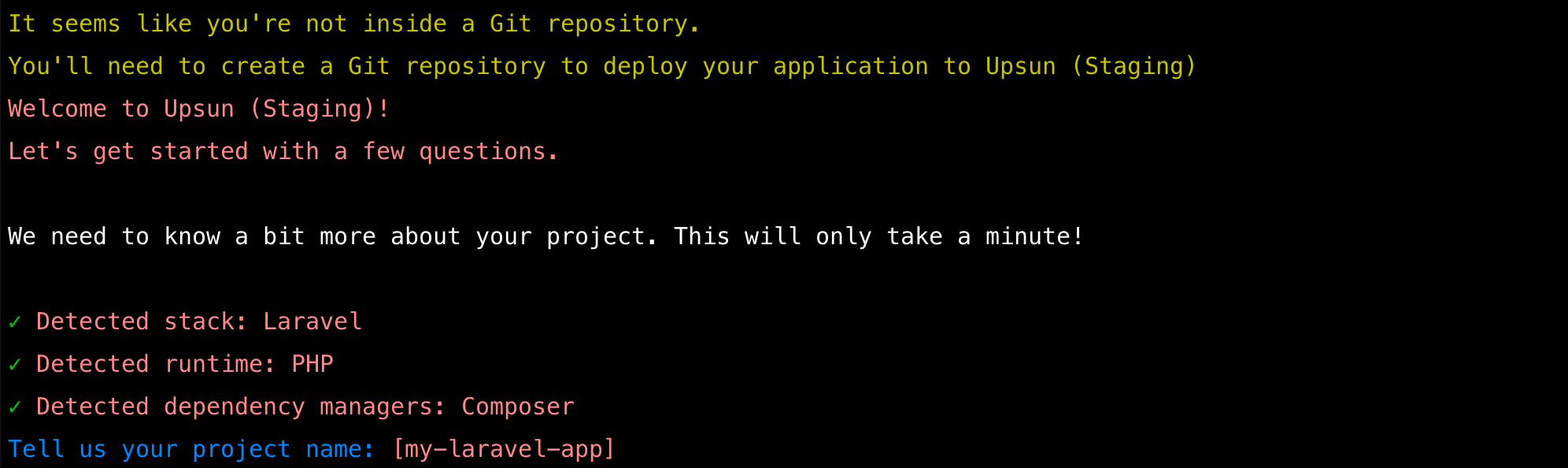
You will be invited to give your project a name and select the different services you intend to use.
The upsun project:init command provide a list of services
whose configuration will be bootstraped for you. Use arrows to move the selector,
space to select a service and type to filter the list.
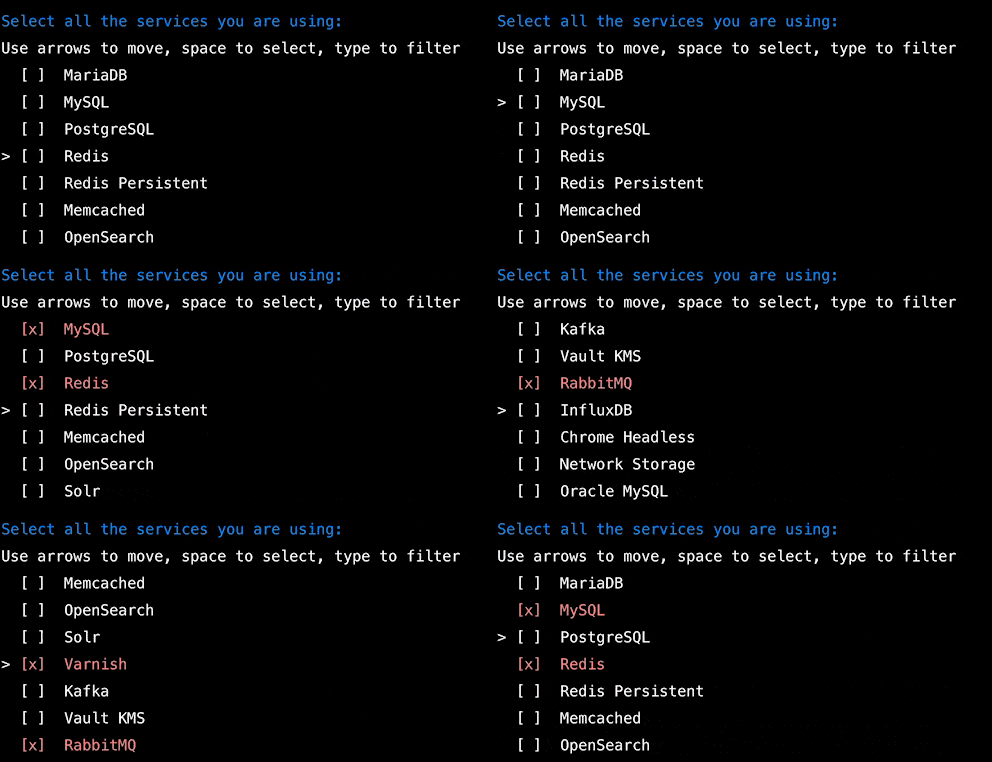
In this exemple, MySQL and Redis were selected.
You could add as many services to your application as you wish. Depending on your
application complexity, the upsun project:init command might not generate the whole
configuration files for you, but will get your started with 80% to 90% of it ready.
Configure apps
Your app configuration in the applications top-level key of the .upsun/config.yaml file
allows you to configure nearly any aspect of your app.
For all of the options, see a complete reference. The following example shows a complete configuration with comments to explain the various settings.
# Complete list of all available properties: https://docs.upsun.com/create-apps/app-reference.html
applications:
  my-laravel-app:
    # Application source code directory
    source:
      root: "/app"

    # The runtime the application uses.
    # Complete list of available runtimes: https://docs.upsun.com/create-apps/app-reference.html#types
    type: "php:8.2"

    # How many resources to devote to the app. Defaults to AUTO in production environments.
    # More information: https://docs.upsun.com/create-apps/app-reference.html#sizes
    # size:

    # The relationships of the application with services or other applications.
    # The left-hand side is the name of the relationship as it will be exposed
    # to the application in the UPSUN_RELATIONSHIPS variable. The right-hand
    # side is in the form `<service name>:<endpoint name>`.
    # More information: https://docs.upsun.com/create-apps/app-reference.html#relationships
    relationships:
      mysql: "mysql:mysql"
      redis: "redis:redis"


    # Mounts define directories that are writable after the build is complete.
    # More information: https://docs.upsun.com/create-apps/app-reference.html#mounts
    mounts:
      "/.config":
        source: "storage"
        source_path: "config"

      "bootstrap/cache":
        source: "tmp"
        source_path: "cache"

      "storage":
        source: "storage"
        source_path: "storage"


    # The web key configures the web server running in front of your app.
    # More information: https://docs.upsun.com/create-apps/app-reference.html#web
    web:
      # Commands are run once after deployment to start the application process.
      # More information: https://docs.upsun.com/create-apps/app-reference.html#web-commands
      # commands:
        # The command to launch your app. If it terminates, it’s restarted immediately.
      #   You can use the $PORT or the $SOCKET environment variable depending on the socket family of your upstream
      #   PHP applications run PHP-fpm by default
      #   Read about alternative commands here: https://docs.upsun.com/languages/php.html#alternate-start-commands
      #   start: echo 'Put your start command here'
      # You can listen to a UNIX socket (unix) or a TCP port (tcp, default).
      # For PHP, the defaults are configured for PHP-FPM and shouldn't need adjustment.
      # Whether your app should speak to the webserver via TCP or Unix socket. Defaults to tcp
      # More information: https://docs.upsun.com/create-apps/app-reference.html#where-to-listen
      # upstream:
      #  socket_family: unix
      # Each key in locations is a path on your site with a leading /.
      # More information: https://docs.upsun.com/create-apps/app-reference.html#locations
      locations:
        "/":
          passthru: "/index.php"
          root: "app/public"


    # Alternate copies of the application to run as background processes.
    # More information: https://docs.upsun.com/create-apps/app-reference.html#workers
    # workers:

    # The timezone for crons to run. Format: a TZ database name. Defaults to UTC, which is the timezone used for all logs
    # no matter the value here. More information: https://docs.upsun.com/create-apps/timezone.html
    # timezone: <time-zone>

    # Access control for roles accessing app environments.
    # More information: https://docs.upsun.com/create-apps/app-reference.html#access
    # access:

    # Variables to control the environment. More information: https://docs.upsun.com/create-apps/app-reference.html#variables
    # variables:
    #   env:
    #     # Add environment variables here that are static.
    #     XDEBUG_MODE: off

    # Outbound firewall rules for the application. More information: https://docs.upsun.com/create-apps/app-reference.html#firewall
    # firewall:

    # Specifies a default set of build tasks to run. Flavors are language-specific.
    # More information: https://docs.upsun.com/create-apps/app-reference.html#build
    build:
      flavor: none

    # Installs global dependencies as part of the build process. They’re independent of your app’s dependencies and
    # are available in the PATH during the build process and in the runtime environment. They’re installed before
    # the build hook runs using a package manager for the language.
    # More information: https://docs.upsun.com/create-apps/app-reference.html#dependencies
    dependencies:
      php:
        composer/composer: "^2"


    # Hooks allow you to customize your code/environment as the project moves through the build and deploy stages
    # More information: https://docs.upsun.com/create-apps/app-reference.html#hooks
    hooks:
      # The build hook is run after any build flavor.
      # More information: https://docs.upsun.com/create-apps/hooks/hooks-comparison.html#build-hook
      build: |
        set -eux
        composer --no-ansi --no-interaction install --no-progress --prefer-dist --optimize-autoloader --no-dev

      # The deploy hook is run after the app container has been started, but before it has started accepting requests.
      # More information: https://docs.upsun.com/create-apps/hooks/hooks-comparison.html#deploy-hook
      deploy: |
        set -eux

        # ensure the cache directories are available
        mkdir -p storage/framework/cache/data
        mkdir -p storage/framework/views
        mkdir -p storage/framework/sessions

        php artisan optimize:clear
        php artisan migrate --force


      # The post_deploy hook is run after the app container has been started and after it has started accepting requests.
      # More information: https://docs.upsun.com/create-apps/hooks/hooks-comparison.html#deploy-hook
      # post_deploy: |

    # Scheduled tasks for the app.
    # More information: https://docs.upsun.com/create-apps/app-reference.html#crons
    # crons:

    # Customizations to your PHP or Lisp runtime. More information: https://docs.upsun.com/create-apps/app-reference.html#runtime
    # runtime:

    # More information: https://docs.upsun.com/create-apps/app-reference.html#additional-hosts
    # additional_hosts:
Add services
You can add the managed services you need for you app to run in the services top-level key of the .upsun/config.yaml file.
You pick the major version of the service and security and minor updates are applied automatically,
so you always get the newest version when you deploy.
You should always try any upgrades on a development branch before pushing to production.
You can add other services if desired, such as Solr or Elasticsearch. You need to configure Laravel to use those services once they’re enabled.
Each service entry has a name (db and cache in the example)
and a type that specifies the service and version to use.
For services that store persistent data, you can specify the amount of disk storage you need.
# The services of the project.
#
# Each service listed will be deployed
# to power your Upsun project.
# More information: https://docs.deployfriday.net/add-services.html
# Full list of available services: https://docs.deployfriday.net/add-services.html#available-services
services:
  mysql:
    type: mysql:10.6 # All available versions are: 10.6, 10.5, 10.4, 10.3

  redis:
    type: redis:7.0 # All available versions are: 7.0, 6.2
Define routes
All HTTP requests sent to your app are controlled through the routing and caching
you define in the routes top-level key of the .upsun/config.yaml file.
The two most important options are the main route and its caching rules.
A route can have a placeholder of {default},
which is replaced by your domain name in production and environment-specific names for your preview environments.
The main route has an upstream, which is the name of the app container to forward requests to.
You can enable HTTP cache.
The router includes a basic HTTP cache.
By default, HTTP caches includes all cookies in the cache key.
So any cookies that you have bust the cache.
The cookies key allows you to select which cookies should matter for the cache.
Generally, you want the user session cookie, which is included in the example for Laravel.
You may need to add other cookies depending on what additional modules you have installed.
You can also set up routes as HTTP redirects.
In the following example, all requests to www.{default} are redirected to the
equivalent URL without www. HTTP requests are automatically redirected to HTTPS.
If you don’t define a routes top-level key in the .upsun/config.yaml file, a single default route is used. This is equivalent to the following:
routes:
  https://{default}/:
    type: upstream
    upstream: <APP_NAME>:http
Where <APP_NAME> is the name you’ve defined in your app configuration.
The following example presents a complete definition of a main route for a Laravel app:
# The routes of the project.
#
# Each route describes how an incoming URL is going
# to be processed by Upsun.
# More information: https://docs.deployfriday.net/define-routes.html
routes:
  "https://{default}/":
    type: upstream
    upstream: "my-laravel-app:http"
  # A basic redirect definition
  # More information: https://docs.deployfriday.net/define-routes.html#basic-redirect-definition
  "https://www.{default}":
    type: redirect
    to: "https://{default}/"
Configure writable cache directories
Laravel requires specific cache folders to be writable. Mounts define directories that are writable after the build is complete.
Let’s ensure the bootstrap/cache and storage directories are writable
by checking the mounts definition of your .upsun/config.yaml file:
mounts:
    ...

    "bootstrap/cache":
      source: "tmp"
      source_path: "cache"

    "storage":
      source: "storage"
      source_path: "storage"
A Laravel specific cache folder should be created, if missing, while the application
is being deployed. Multiple hooks run
as part of the process of building and deploying your app. These are places where
you can run custom scripts, such as this deploy hook that ensures caches are correctly
set up and warmed:
deploy: |
    set -eux

    # ensure the cache directories are available
    mkdir -p storage/framework/cache/data
    mkdir -p storage/framework/views
    mkdir -p storage/framework/sessions

    # clear all caches and dumped files
    php artisan optimize:clear

    # run all available migrations
    php artisan migrate --force
Commit and bridge with Upsun
Now that you have Laravel configured, let’s commit all you configuration files:
git add .
git commit -m "Add Upsun configuration files"
The following step is to connect it with Laravel Bridge.